Toast Payroll: View Your Paystub or Timesheet
Last updated: Oct 15, 2026, 11:58 AM
This article includes step-by-step instructions on how to find electronic paystubs and timesheets for current and former employees.
- Before You Begin
- Where Can I Find My Paystub?
- View Your Paystub in the MyToast App
- View Your Paystubs in Toast Payroll
- View Your Timesheet
- View Paystubs as a Former Employee
- Frequently Asked Questions
- Related Articles
Before You Begin
Applies to: Toast Payroll (current employees, former employees)
Permissions needed:
- Active or former employee login to the MyToast app or to Toast Payroll at payroll.toasttab.com.
What you'll accomplish: View, download, or print your paychecks, paystubs, and timesheets from the MyToast app or the Toast Payroll website.
Note: This article covers viewing your own paystubs and timesheets as an employee. If you are a manager or admin trying to view another employee's paystub or fix a timesheet, please see this FAQ below and Toast Payroll: Manage Timesheets.
Where Can I Find My Paystub?
There are two ways to get to your paystub, and you do not need to install an app to use the second one:
- MyToast app: Open the app and select the Pay tab. Select a pay period tile to see earnings, deductions, taxes, hours, and gross and net pay.
- Any web browser: Log in to payroll.toasttab.com, then navigate to My Profile > Pay History > Pay Stubs.
- If you do not see My Profile on the left side of the screen, select Payroll from the Toast Web navigation rail on the left to make the Toast Payroll navigation rail appear.
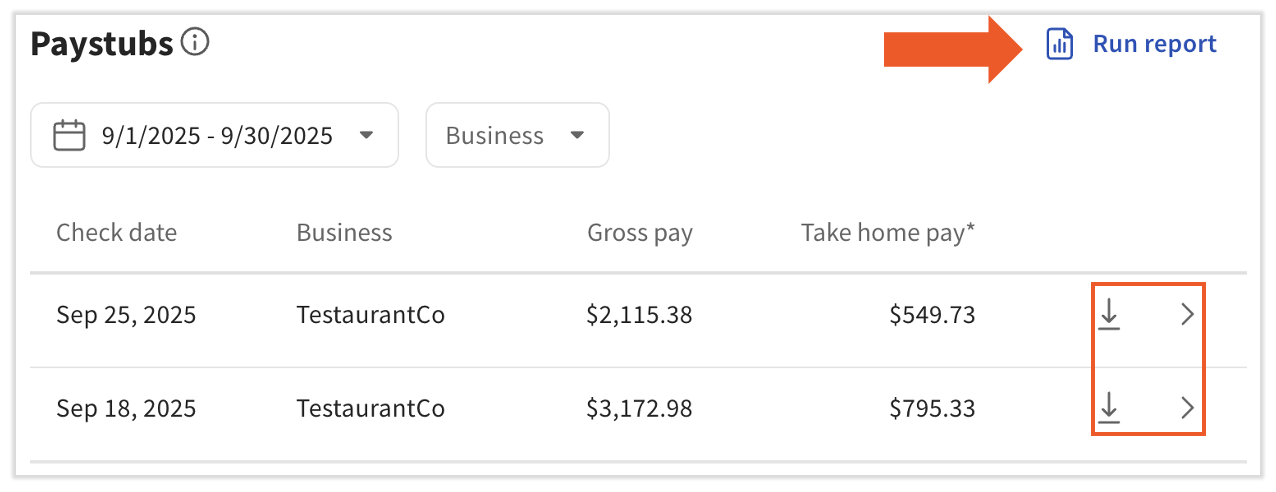
To download or print an official pay stub, use the Toast Payroll website. On the Pay Stubs page, select the download arrow to the right of a paystub entry to save it as a PDF, or select the > icon on the far right of the entry to open the full paystub in its own tab and print it from there. The MyToast app shows your paycheck details but sends you to the Toast Payroll website to complete a download.
View Your Paystub in the MyToast App
The MyToast app shows your paycheck details on the Pay tab. To download or print an official paystub, you will be sent to the Toast Payroll website.
- Open the MyToast app. If you do not already have the app or need help logging in, see Get Started With the MyToast App and Log in to a Toast Product or Device.
- Select the Pay tab.
- On the Paystubs screen, paycheck details are sorted by most recent pay period. Select a tile to open the pay period and view its information.
- Review your earnings, deductions, taxes, hours worked, and gross and net pay amounts.
- If your restaurant uses Toast Tips Manager to pool or share tips, tip pool calculations are on the Shifts tab. See The MyToast App: Shifts to locate them.
- To download a paystub from the MyToast app, select the download icon in the upper-right corner of the screen. You will be taken to the Toast Payroll website. Follow the steps in the next section to complete the download.
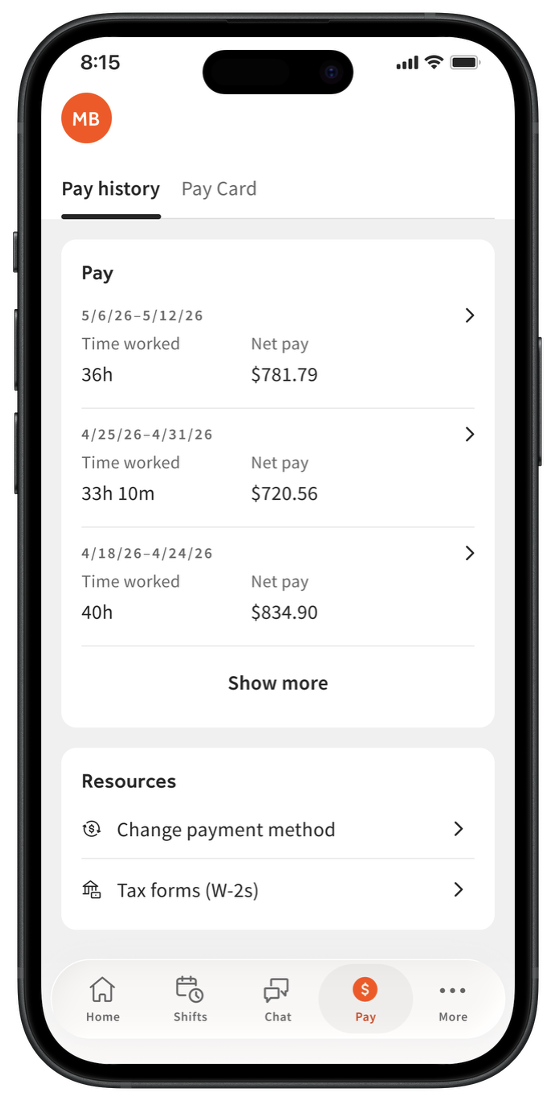
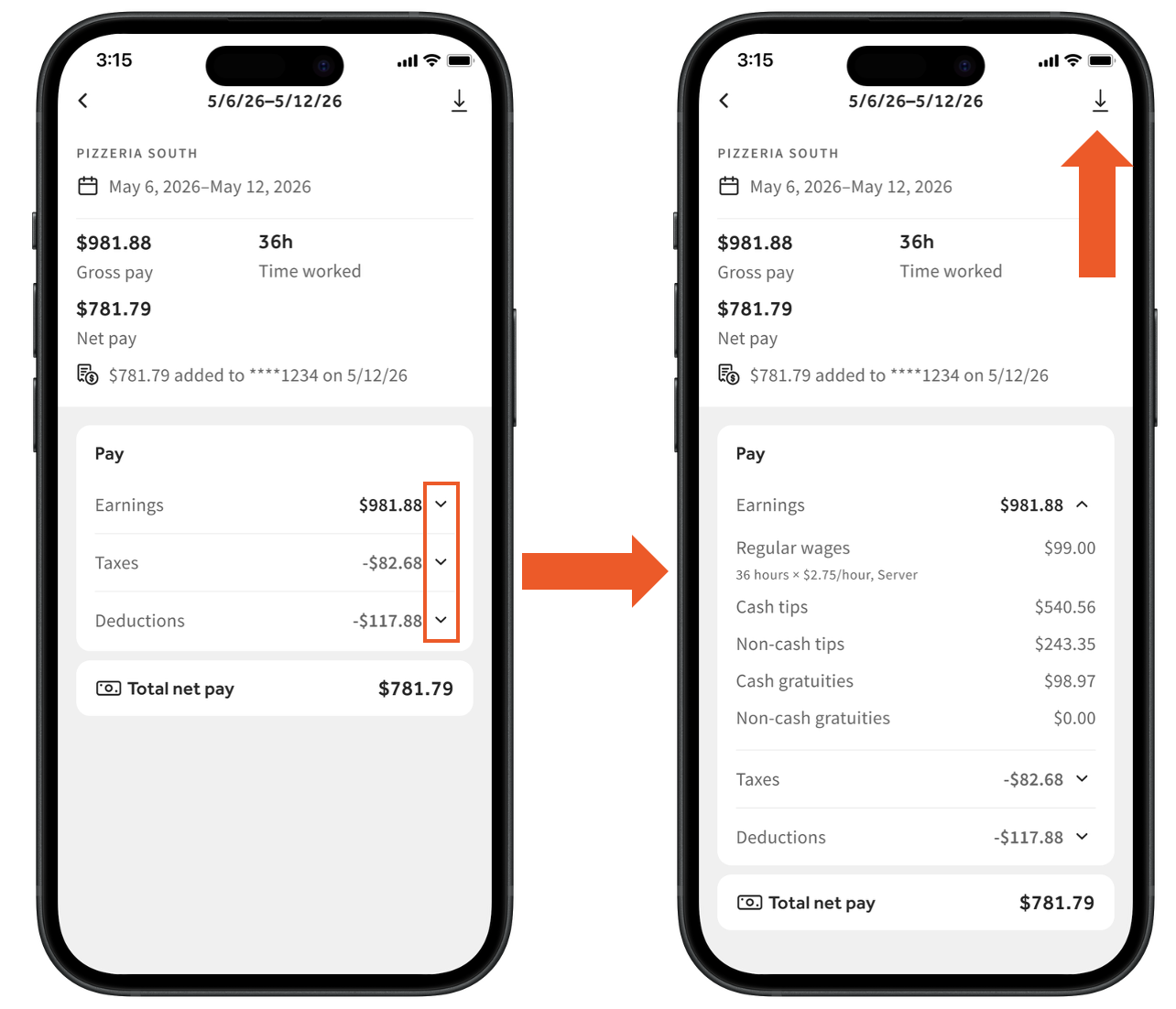
Expected outcome: You can see your paycheck details by pay period in the MyToast app. To get a downloadable, official paystub, continue to the next section.
View Your Paystubs in Toast Payroll
Use the Toast Payroll website to view, download, or print your official paystubs. For the best experience, use Google Chrome.
- Log in to Toast Payroll at payroll.toasttab.com. If you need help logging in, see Log in to a Toast Product or Device.
- From the dashboard, select View paystubs from the Paystubs tile. Otherwise, you can navigate to My Profile > Pay History > Pay Stubs.
- If you do not see My Profile on the left side of the screen, select Payroll from the Toast Web navigation rail on the left to make the Toast Payroll navigation rail appear.
- At the top of the page, a bar shows highlights of your most recent pay. Selecting the > caret icon on the right automatically pulls up your most recent paystub.
- If you work for more than one federal employer identification number (FEIN), select the appropriate FEIN from the Business drop-down.
- Below the drop-down menus are your paystub entries within the selected date range. To download or print a paystub, select the download arrow on the right of any paystub entry.
- Select the > icon on the far right of any paystub entry to open a separate tab containing your entire paystub.
- A paystub entry with an overflow icon (...) has more than one paystub for that time period. Download each individual paystub file from this menu.
- Note: When you work at more than one location during the same pay period, you may receive two paychecks and two paystubs on the same day. They appear on this page as a cumulative total. If you only received a partial amount of your expected wages, you may have only received the amount from one payroll — a second payroll will create a second deposit.
- Depending on your restaurant's Toast Payroll subscription, your paystub shows some combination of earnings, deductions, taxes, benefits, and time away from work balances.

Note: If you have accessed earned wages through Toast PayOut, the amount appears on your paystub under After Tax Deductions and Other as "Toast PayOut (Early Earned Wage Access)."
Expected outcome: You can view, download, or print your official paystubs from the Toast Payroll website.
Run a Paystub Report by Date Range
To pull up a report of multiple paystubs by date range, follow these steps. Employees, managers, and HR+ users can all do this.
- On an employee's Paystubs page in Toast Payroll, select Run Report.
- Learn how the new Toast Payroll navigation works by visiting Navigate Toast Payroll Within Toast Web.
- Enter the Date range you are looking for.
- Choose a Report type:
- Summary displays all paystubs summed up in one, which is useful for year-to-date (YTD) pay.
- Detail keeps each paystub separate.
- Select View report.
- A print option is not built into this report. To print an Employee pay history report, click and drag your cursor over all the text on the page, beginning with the FEIN name at the top and ending at the bottom (scroll all the way down). Right-click within the highlighted area and select Print. Saving as a PDF first makes formatting easier, but is not required.
Expected outcome: You can view a Summary or Detail report of paystubs for the date range you entered, and you can print or save the page using your browser.
Back to top | Back to View your paystubs in Toast Payroll
View Your Timesheet
Timesheets in Toast Payroll show the dates and hours you worked. Use them to track your hours, tips, breaks, and time away from work (TAFW), if applicable. Timesheets are only available as a digital version in Toast Payroll.
- Log in to Toast Payroll at payroll.toasttab.com. If you need help logging in, see Log in to a Toast Product or Device.
- From the dashboard, select View paystubs from the Paystubs tile. Otherwise, navigate to My Profile > Pay History > Timesheets.
- If you do not see My Profile on the left side of the screen, select Payroll from the Toast Web navigation rail on the left to make the Toast Payroll navigation rail appear.
- Select the Timesheets tab on the left.
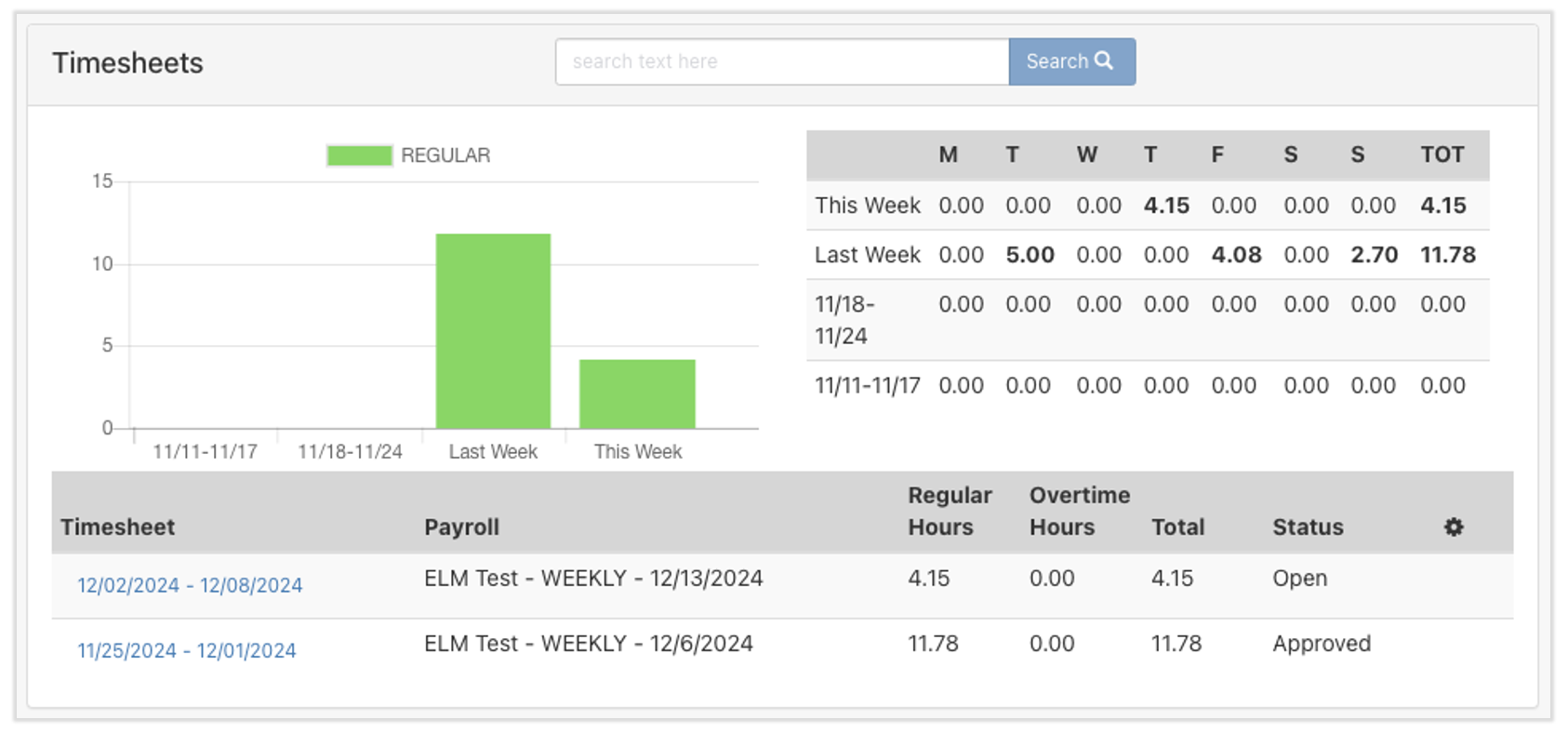
- The page shows a graph, a table, and a list of timesheets. These are different ways to compare your recorded hours worked over time. The table in the upper-right corner quickly shows how many hours were recorded for a given day or week.
- The list of timesheets at the bottom contains hyperlinks to view more details. The status of each timesheet tells you whether it can still change:
- Approved — the timesheet is closed and is being used or has been used to process payroll.
- Open — the period has not yet been approved for payroll, so time entries may still be added or edited.
- Select a timesheet's hyperlink to view details. REGULAR earnings are an hourly employee's typical recording of hours per their pay rate. Tips and breaks also appear on this page, if applicable.
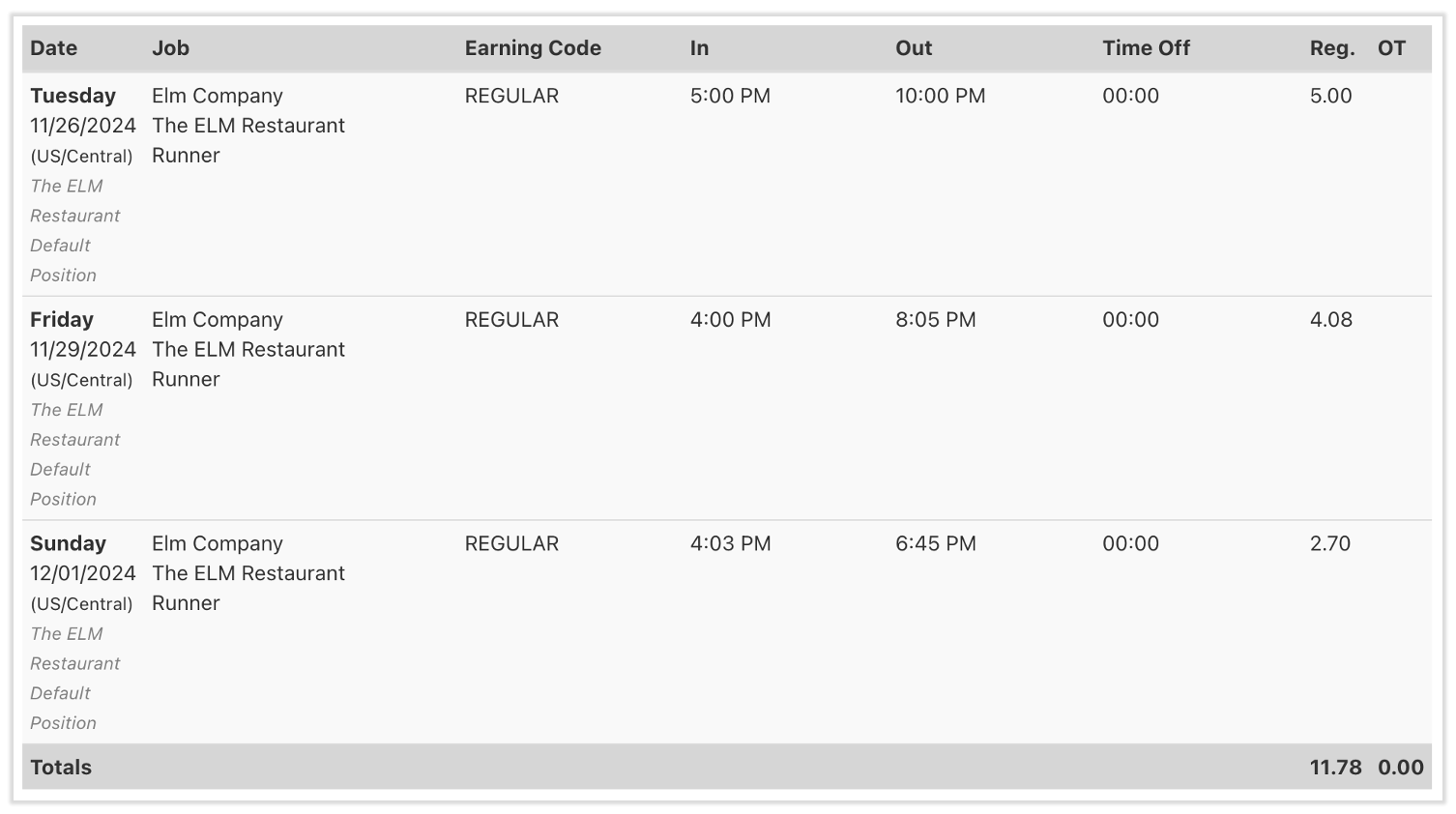
Note: If you think there is an error on your timesheet, contact your manager or HR team for corrections. Employees cannot edit a timesheet directly.
Expected outcome: You can view your timesheets, hours worked, tips, breaks, and the status of each pay period.
View Paystubs as a Former Employee
Former employees keep limited access to the Toast Payroll system, mostly for paystub and year-end document access. Follow the steps in View your paystubs in Toast Payroll — the steps are the same.
If Toast Payroll files taxes on your previous company's behalf at the end of the year, you can retrieve your Form W-2 or other year-end documents from Toast Payroll.
Note: Former employees do not have access to Form W-2s through the MyToast app. Year-end documents must be retrieved through the Toast Payroll website.
Frequently Asked Questions
What is a paystub?
Also asked as:
-
- What is a pay stub?
- What's the difference between a paystub and a paycheck?
A paystub is the electronic record of the components of a payment. When you receive wages by any payment method (paper check, direct deposit, or the Toast Pay Card), Toast Payroll generates a paystub showing earnings, deductions, and taxes for the pay period. A paystub is sometimes called a pay slip or wage statement.
If you use the Toast Pay Card and your employer allows Toast PayOuts, a paystub is generated at the end of the pay period rather than for each individual PayOut.
How do I get a paper paystub?
You can get a paper paystub in two ways:
-
- Download and print an electronic paystub from Toast Payroll. See View your paystubs in Toast Payroll.
- Receive a paper paystub with a paper paycheck. If you receive your paycheck by direct deposit and would still like a paper paystub, your employer can request this by contacting Customer Care with the associated company code and pay group name(s).
Also asked as:
-
- Can I get a printed paystub?
- How do I get a hard copy paystub?
Why can't I see my most recent paystub?
If you cannot see your most recent paystub, check each of the following:
-
- Are you on the Pay tab in the MyToast app? See The MyToast App: Pay.
- On a computer, your most recent paystub always appears at the top of the page. It will not appear in the list below if you have a date range set to exclude it.
- On a computer, use Google Chrome. You may also need to clear your cache and cookies.
- If you work for more than one federal employer identification number (FEIN), select the appropriate FEIN from the Business drop-down.
- The payroll has not yet been submitted, and your funds have not yet been received. Check with your manager on the timing of your paycheck and paystub.
If you have tried each item above and you still cannot see or download your paystub, contact your manager for assistance.
Also asked as:
-
- Where's my paystub?
- I don't see my paystub for this week
- My paystub isn't showing
How do I download my paystubs?
To download a paystub, use the Toast Payroll website. The MyToast app shows your paycheck details, but only paystubs on the Toast Payroll website can be downloaded and printed. Follow the steps in View your paystubs in Toast Payroll, then select the download arrow on the right of any paystub entry.
Also asked as:
-
- Trying to download my paystub but it just opens them
- How do I save my paystub as a PDF?
Can an employer download or print an employee's paystub?
Yes. Admins with payroll access can download and print any employee's paystub from Toast Payroll:
-
- Go to Payroll > Past Payrolls.
- When the Toast Web and Toast Payroll navigation menus are both visible, select Payroll from the Toast Payroll navigation sub-menu. If you don't see the Toast Payroll sub-menu, selecting Payroll from the Toast Web navigation menu will expand it.
- Select View on the payroll that contains the paystub you need.
- Open the Employee Detail Report.
- Find the employee and open their paystub entry.
- Select the download arrow to save the paystub as a PDF, then print the PDF.
- Go to Payroll > Past Payrolls.
This is the path to use when an employee needs a paystub as proof of income or identity and cannot download it themselves.
Also asked as:
-
- Can I print an employee's paystub?
- How do I download paystub for an employee?
- How do I see past paystub for my employees?
- Where can I find an individual staff member's paystub with deductions and withholdings?
- How to print just one person's paystub off of employee detail report?
Can I send my paystub to my bank?
To start, stop, or change direct deposit, go to Toast Payroll at payroll.toasttab.com and update your payment method — see Toast Payroll: Set a Payment Method for the steps. A paystub is a record of a payment that has already happened; it is not a money transfer and cannot be sent to a bank to move funds.
If your bank or landlord needs proof of income, download your paystub from Toast Payroll as a PDF and send it to them directly. Follow the steps in View your paystubs in Toast Payroll.
Also asked as:
-
- How do I send my paystub to a bank?
- I can't send my paystub to my bank
- I need help switching to direct deposit
- How do I set up direct deposit?
- How do I change where my paycheck is deposited?
What is a timesheet?
A timesheet (also called a time card) is a record of the dates and hours an employee worked. Toast Payroll uses your timesheet to calculate your pay. Timesheets may also show your tips, breaks, and time away from work (TAFW). Timesheets are only available digitally in Toast Payroll.
Also asked as:
-
- What's a time card?
- What does timesheet mean in Toast Payroll?
Related Articles
- Get Started With the MyToast App
- The MyToast App: Pay
- Log in to a Toast Product or Device
- Toast Payroll: Payroll Processing and Paystub FAQ
- Toast Payroll: Review Paycheck Delivery Options
- Toast Payroll: Set a Payment Method
This content is for informational purposes and is not intended as legal, tax, HR, or any other professional advice. Please contact an attorney or other professional for advice.